Claude Desktop quietly runs a 2 GB VM on every launch — here's the setting that turns it off
A GitHub issue open since February hit Hacker News' front page on June 10, 2026: Claude Desktop spawns a ~1.8 GB Hyper-V VM (Vmmem) on Windows — and a similar VM on macOS — every time it starts, even for chat-only use. The VM powers the Cowork sandbox. A community-reported config flag, secureVmFeaturesEnabled: false, appears to disable it.
If Claude Desktop feels heavier than a chat app should, it is not your imagination. The app boots a full virtual machine on every launch — about 1.8 GB of RAM on Windows (visible as Vmmem in Task Manager) and 1.9–3+ GB on macOS via Apple’s Virtualization framework — even if all you ever do is chat. The bug report has been open since February 26, 2026 and hit Hacker News’ front page on June 10 with 400+ points. (Source: GitHub issue #29045)
Key facts:
- On Windows, Claude Desktop triggers the Hyper-V Host Compute Service at launch and spawns a VM consuming ~1,800 MB, before you type anything. (Source: GitHub issue #29045, 2026-02-26)
- macOS is affected too: users report 1.89 GB on an M4 MacBook Air and 3 GB+ on M4 Pro machines; one Hacker News commenter measured 12 GB. (Source: GitHub issue comments; Hacker News, 2026-06-10)
- The VM exists to sandbox Cowork, Claude’s local agent mode. Community analysis says Anthropic pre-boots it at startup to make Cowork launch faster — whether you use Cowork or not. (Source: GitHub issue comments)
- It costs disk as well as RAM: a ~2 GB
rootfs.vhdxdownload on Windows and a VM bundle users measure at 6–10 GB on macOS, with no built-in way to remove it. (Source: GitHub issue comments; Hacker News, 2026-06-10) - One user found 2,689 stale Cowork session files that were never cleaned up. (Source: GitHub issue #29045)
- As of June 11, the issue is still open with no public response from Anthropic in the thread.
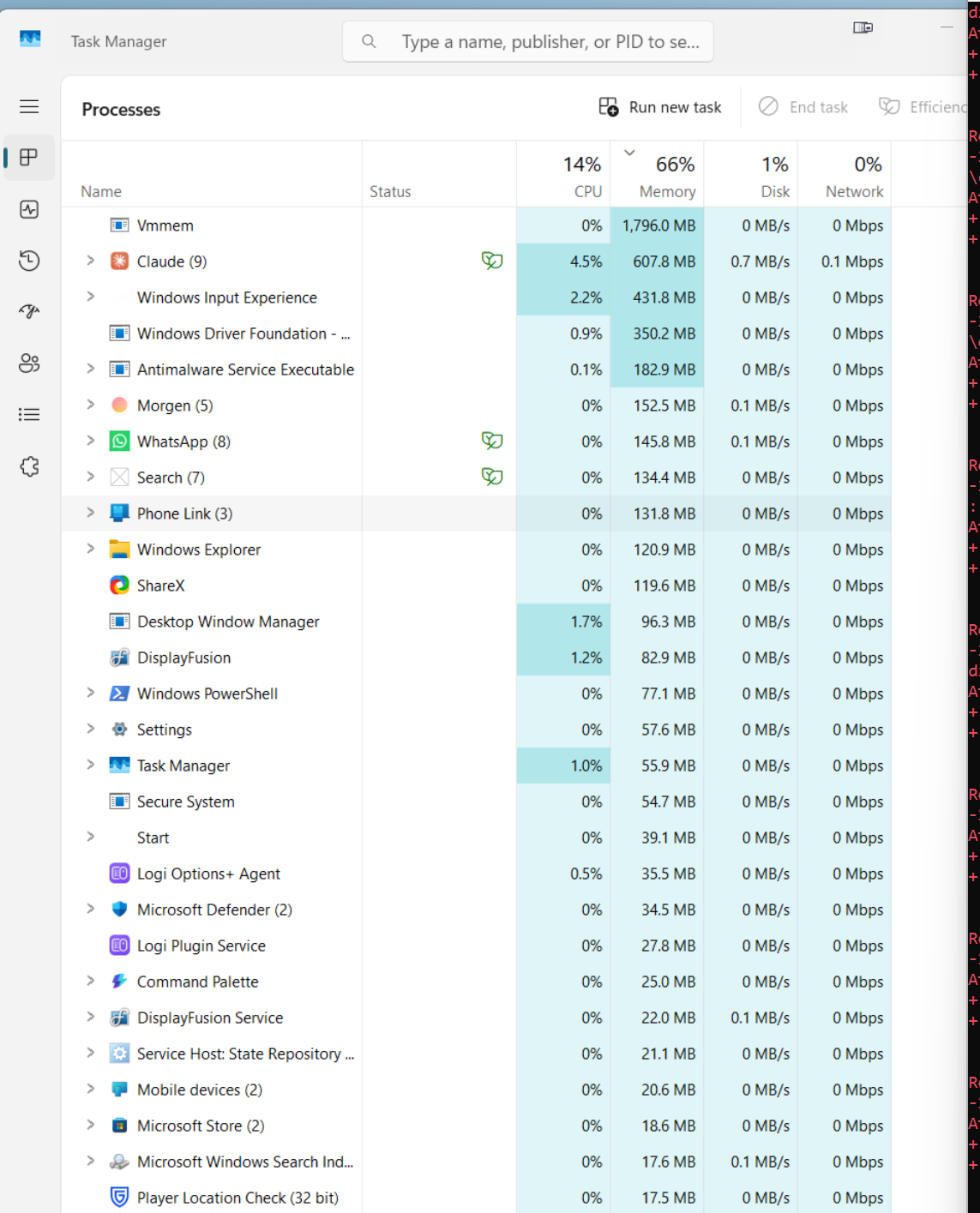 Vmmem at ~1.8 GB right after launching Claude Desktop, before any Cowork use. (Source: GitHub issue #29045, reported by davidellett)
The fix: one config flag
On June 10, a commenter on the issue posted what looks like the cleanest workaround so far. In Claude Desktop, open Developer → Open App Config File and add:
{
  "preferences": {
    "secureVmFeaturesEnabled": false
  }
}
Restart the app and the VM should no longer spawn. (Source: GitHub issue comment by gtirloni, 2026-06-10 — community-reported; we have not independently verified it, and it presumably disables Cowork.)
If the flag doesn’t work for you
- Windows, nuclear option:
Disable-WindowsOptionalFeature -Online -FeatureName "VirtualMachinePlatform" -NoRestartin an admin PowerShell. This blocks the VM entirely but also breaks Cowork — and anything else on your machine that needs the platform, like WSL2. (Source: GitHub issue #29045) - Kill the processes:
Stop-Process -Name vmwp -Forcereclaims the RAM and chat keeps working, though some users report the VM respawns on its own. (Source: GitHub issue comments) - macOS: fully quitting Claude Desktop (Cmd+Q) releases the VM memory — until the next launch.
The bigger picture: if you mostly use Claude for coding work anyway, the desktop app’s overhead is a good reason to live in the terminal instead. Claude Code as a daily driver covers that setup, and if you are switching models too, see how to switch to Claude Fable 5.
Source: GitHub (anthropics/claude-code)