Cloudflare ships temporary accounts for AI agents — `wrangler deploy --temporary` puts a live URL behind your coding agent
Cloudflare added temporary accounts on June 19, 2026: an AI agent runs `wrangler deploy --temporary` and gets a live Worker on a .workers.dev URL with no signup, no OAuth, no token copy-paste. The deployment lasts 60 minutes; a human claims it to keep it. Here is what changes if your coding agent needs to actually ship something.
Cloudflare shipped temporary accounts on June 19, 2026. (Source: Cloudflare Changelog, 2026-06-19) An AI agent can now deploy a live Cloudflare Worker without first creating an account, logging in, or copying an API token.
Key facts:
- The command is
npx wrangler deploy --temporary. - It requires Wrangler 4.102.0 or later. (Source: Cloudflare Workers docs)
- The temporary deployment stays live for 60 minutes.
- A human claims it within that window to make it permanent; otherwise Cloudflare deletes it.
- Supported resources include Workers, Static Assets, KV, D1 (one database, up to 100 MB), Durable Objects, Hyperdrive, and Queues.
What actually happens
Run a plain wrangler deploy with no credentials and Wrangler now tells you to “rerun this command with --temporary.” Rerun it, and Cloudflare provisions a throwaway account, hands Wrangler a scoped API token, and deploys your Worker to an auto-named .workers.dev subdomain. The CLI prints a claim URL the agent can pass back to a human. (Source: Cloudflare Blog, 2026-06-19)
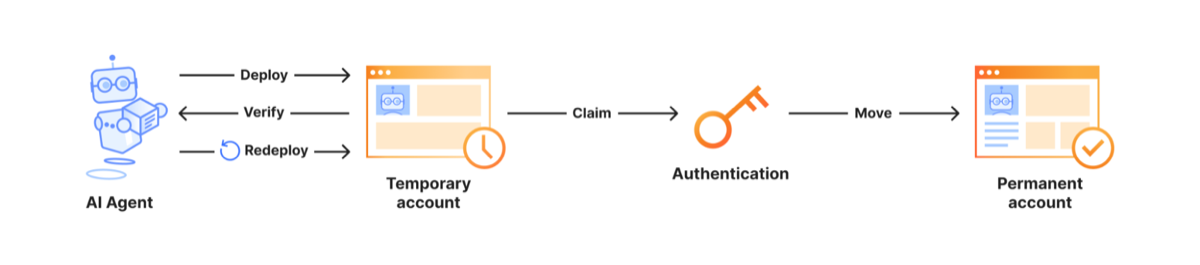 Cloudflare’s official flow: the agent ships and iterates against a temporary account; a human claims it to keep it. (Source: Cloudflare Blog, 2026-06-19)
The agent can redeploy as many times as it wants inside the 60-minute window — Wrangler caches the temporary account and reuses it. Cloudflare gates the flow with a proof-of-work challenge and forces acceptance of its Terms of Service to limit abuse.
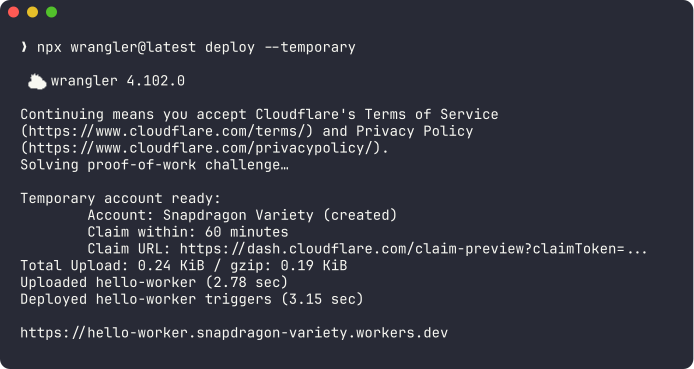 The real output: account auto-named, “Claim within: 60 minutes,” a claim URL, and a live
 *.workers.dev URL. (Source: Cloudflare Blog, 2026-06-19)
What this means if you’re building with coding agents
The problem Cloudflare names is real: an autonomous agent that writes a working app “slams face-first into a wall built for humans — a browser-based OAuth flow, a dashboard to click through, an API token to copy-paste.” (Source: Cloudflare Blog, 2026-06-19) Temporary accounts turn “the agent wrote it” into “the agent shipped it, here’s the URL.”
- Wire
--temporaryinto your agent’s deploy step. If your harness can run a demo, it can now produce a live link instead of a screenshot. The claim URL is a clean human-in-the-loop checkpoint: the agent ships, you decide whether to keep it. - The blast radius is bounded by design. Auto-delete after 60 minutes plus tiny quotas (1,000 static files, 100 MB D1, 10 queues) means a misbehaving or untrusted agent can’t run up a bill or leave permanent infrastructure behind. That makes it safer to let an agent deploy than to hand it your real account token.
- Treat it as a preview tool, not production. Sixty minutes and 100 MB are throwaway-demo numbers. Keeping anything still requires a real Cloudflare account and a human claim — the friction moved, it didn’t disappear.
Be honest about the framing, too. As Simon Willison points out, the “for AI agents” label is mostly marketing — credential-free ephemeral deploys are just as handy for a human spinning up a quick throwaway demo.
If you’re deciding how to wire deploy steps into a coding-agent stack, see our Claude Code daily-driver setup, the multi-harness orchestration breakdown, and Claude Code vs Codex head-to-head.
Sources:
Source: Cloudflare Blog