Qualcomm's GenieX runs local LLMs on Snapdragon — with an OpenAI-compatible server
Qualcomm shipped GenieX, an open-source (BSD-3) on-device inference runtime that runs GGUF LLMs and VLMs on Snapdragon NPU, GPU, and CPU. It exposes a CLI, Python, Android, Docker, and an OpenAI-compatible server on localhost — so existing OpenAI clients drop in with a base-URL swap. Here's what it means if you build local-first AI, and the one hard catch.
Qualcomm released GenieX, an on-device generative-AI inference runtime for its own Snapdragon silicon. (Source: Qualcomm GenieX GitHub, v0.3.14, 2026-07-02) The pitch for builders isn’t a new model — it’s a local runtime that runs the GGUF weights you already use and ships an OpenAI-compatible server, so an app written against the OpenAI SDK talks to on-device inference with nothing more than a changed base URL.
Key facts:
- GenieX is BSD-3-Clause licensed and currently in developer preview. (Source: Qualcomm GenieX GitHub)
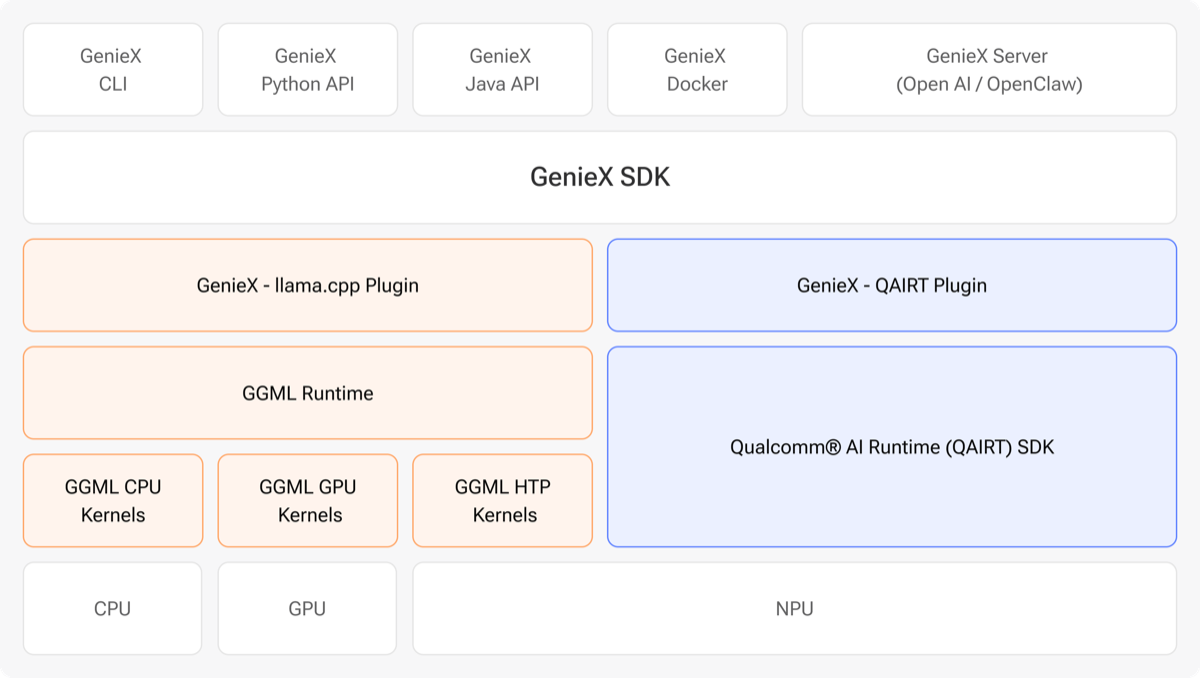
- It exposes five entry points over one SDK: a CLI, a Python API (
AutoModelForCausalLM, mirroring Hugging Facetransformers), an Android Kotlin/Java SDK, a Docker image, and an OpenAI-compatible server athttp://127.0.0.1:18181/v1. - It ships two runtimes: llama.cpp (any GGUF from Hugging Face, running on CPU / GPU / Hexagon NPU, with Q4_0 recommended) and Qualcomm AI Engine Direct (pre-compiled bundles, NPU only).
- It runs only on Snapdragon — Snapdragon X and X Elite on Windows, 8 Elite and 8 Elite Gen 5 on Android, and Dragonwing QCS9075 on Linux.
- The latest release is v0.3.14, published July 2, 2026.
What it looks like in practice
The CLI mirrors the tools you already know. geniex pull ai-hub-models/Qwen3-4B-Instruct-2507 fetches a model, geniex infer google/gemma-4-E4B-it-qat-q4_0-gguf runs one, and geniex serve starts the local OpenAI-compatible endpoint. Because it accepts almost any GGUF from Hugging Face through the llama.cpp path, the model catalog isn’t gated to Qualcomm’s own bundles — Gemma 4, Qwen, and other open weights work the same way they do under llama.cpp’s own server.
What it means if you’re building
The real unlock is the NPU. Running a small model through the Hexagon NPU instead of the CPU is the difference between a laptop or phone that stays cool and one that drains its battery — the same on-device-vs-cloud tradeoff that tools like Cactus’s hybrid router and Harbor’s local agent launcher are built around. And the OpenAI-compatible server means you don’t rewrite anything: point your existing client at 127.0.0.1:18181/v1, keep the model string in config, and swap between a local Snapdragon endpoint and a hosted one as a one-line change — the same portability discipline that lets you flip between running GLM-5.2 locally and calling a hosted API.
Two honest caveats before you build on it. It is Snapdragon-only — no Intel, AMD, Apple, or NVIDIA path — so this is a bet on Windows-on-Arm and Snapdragon Android, not a general local-inference layer. And it is a developer preview: the Python package installs from test.pypi.org, there are no published latency or throughput numbers yet, and the API surface can still move. Prototype on it; don’t ship a product against a preview runtime.
Sources
- Qualcomm GenieX — GitHub repository — license, runtimes, entry points, install and CLI commands, supported platforms
- What is GenieX — Qualcomm AI Hub docs — definition, OpenAI-compatible server, GGUF-via-llama.cpp support
- Windows on Snapdragon AI — Qualcomm developer — Snapdragon X/X2 local-LLM context