How to Use Cursor Composer 2.5: Setup, Pricing & Benchmarks
Last updated: May 21, 2026. Read time: 7 minutes. What you’ll learn: What Composer 2.5 actually is, how it compares to Opus 4.7 and GPT-5.5 on coding benchmarks, the pricing (and the “fast variant” gotcha), how to switch your IDE to use it, and when not to switch.
On May 18, 2026 Cursor shipped Composer 2.5, a substantial upgrade to the in-house coding model that powers the IDE’s autonomous agent. The pitch is simple: same intelligence ballpark as Anthropic’s Opus 4.7, at roughly one-quarter the cost. If you’re paying for a coding model and you live in Cursor, this is the kind of release that changes the build/buy math.
This post walks through the receipts — what Cursor measured, what Cursor charges, and what it actually means for you in the IDE.
1. What’s new vs Composer 2
Cursor’s own description: “It’s a substantial improvement in intelligence and behavior over Composer 2. It is better at sustained work on long-running tasks, follows complex instructions more reliably, and is more pleasant to collaborate with.”
Under the hood, three things changed:
- 25× more synthetic tasks. Composer 2.5 was trained with 25× the volume of synthetic coding tasks vs Composer 2 — the kind of “do this multi-step job in a real repo” examples that teach a model when to read a file, when to run tests, and when to stop.
- Targeted RL with textual feedback. Instead of vanilla reward modeling, Cursor uses textual hints injected into the training rollouts (e.g. “Reminder: available tools are Read, Write, Shell, and StrReplace”) and updates weights only on the steps where the model violated those hints. This is meant to fix specific bad behaviors without re-training from scratch.
- Same base model. It’s still built on Moonshot’s open-source Kimi K2.5 checkpoint, same as Composer 2. Composer 2.5 is what extra training does on top.
The base architecture being open-source matters for one reason: Cursor isn’t dependent on a single closed-model provider’s roadmap. They can keep training on top.
2. The benchmark Cursor wants you to look at
Here is Cursor’s own benchmark table, taken from the official Composer 2.5 release post:
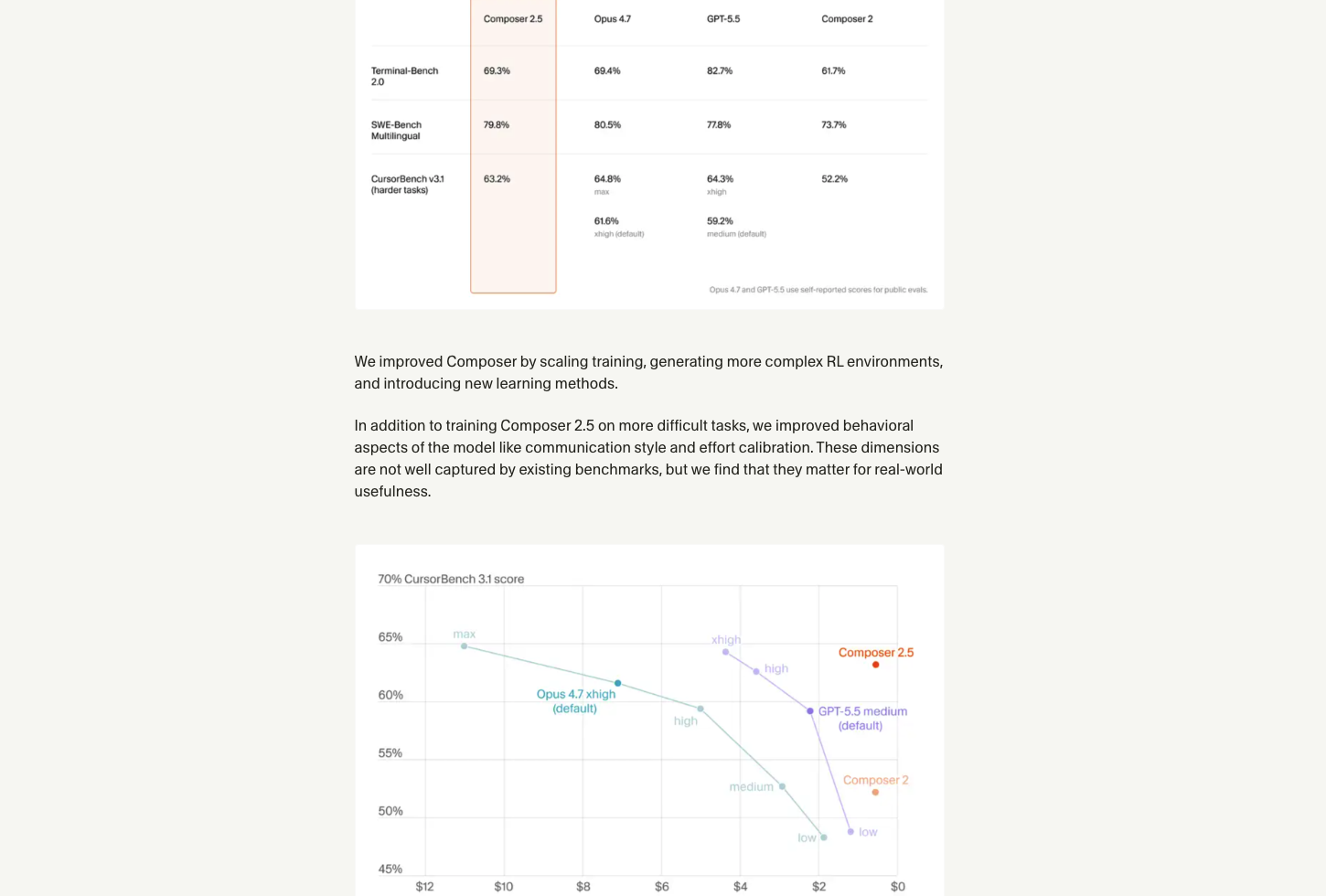
The three numbers that matter for a builder picking a coding model:
| Benchmark | Composer 2.5 | Opus 4.7 | GPT-5.5 | Composer 2 |
|---|---|---|---|---|
| Terminal-Bench 2.0 | 69.3% | 69.4% | 82.7% | 61.7% |
| SWE-Bench Multilingual | 79.8% | 80.5% | 77.8% | 73.7% |
| CursorBench v3.1 (harder tasks) | 63.2% | 64.8% (xhigh) | 64.3% (xhigh) | 52.2% |
Read the table honestly. On Cursor’s own benchmarks, Composer 2.5 is statistically tied with Opus 4.7 on Terminal-Bench and SWE-Bench, and trails GPT-5.5 by ~13 points on Terminal-Bench while leading it by 2 points on SWE-Bench. The bottom row (CursorBench) is the most “honest” one because Cursor designed it for their own agent’s use case — and there Composer 2.5 trades blows.
The scatter plot in the lower half of the image is the more interesting story: same CursorBench score, ~1/4 the cost vs Opus 4.7. If your project budget is fixed, Composer 2.5 lets you spend the savings on more iterations.
Honest caveat: Cursor’s footnote says “Opus 4.7 and GPT-5.5 use self-reported scores for public evals.” That means Cursor ran Composer 2.5 themselves but is comparing against scores Anthropic and OpenAI published. Numbers across vendors are never apples-to-apples — treat the table as “in this neighborhood,” not “definitive winner.”
3. Pricing — and the fast-variant gotcha
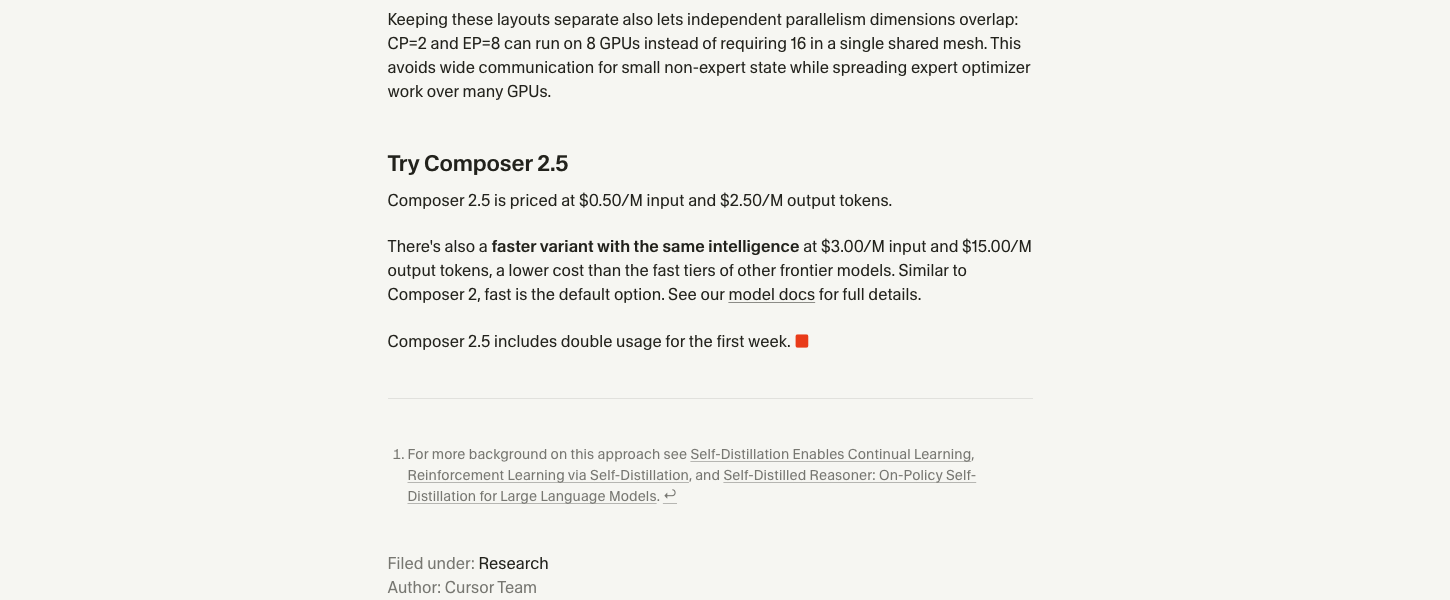
Two tiers, same model:
- Standard Composer 2.5: $0.50 / 1M input tokens, $2.50 / 1M output tokens
- Fast variant (same intelligence, faster inference): $3.00 / 1M input, $15.00 / 1M output
To put that in perspective against the other models on the benchmark table:
| Model | Input ($/M) | Output ($/M) |
|---|---|---|
| Composer 2.5 (standard) | $0.50 | $2.50 |
| Composer 2.5 (fast variant) | $3.00 | $15.00 |
| Claude Opus 4.7 | ~$15.00 | ~$75.00 |
| GPT-5.5 | ~$1.25 | ~$10.00 |
(Opus 4.7 and GPT-5.5 numbers are from each vendor’s pricing page at time of writing — verify on anthropic.com/pricing and openai.com/api/pricing since these move.)
The fast variant is the trap. Cursor’s release says “Similar to Composer 2, fast is the default option” — meaning if you don’t actively choose the standard tier, your bill is 6× higher for the same model. Watch your usage dashboard the first week.
Also note: Composer 2.5 includes double usage for the first week. If you were planning to take it for a real test drive, the week of May 18-25, 2026 is the cheapest window to do it.
4. How to switch your IDE to Composer 2.5
Composer 2.5 is rolling out to Cursor as a model selectable inside the existing agent. There is no separate install — when you open Cursor with a project, Cursor itself pushes a built-in onboarding card the first time the model becomes available to you. Here’s the actual screen, captured from a clean launch of Cursor 3.4 with a fresh project folder:
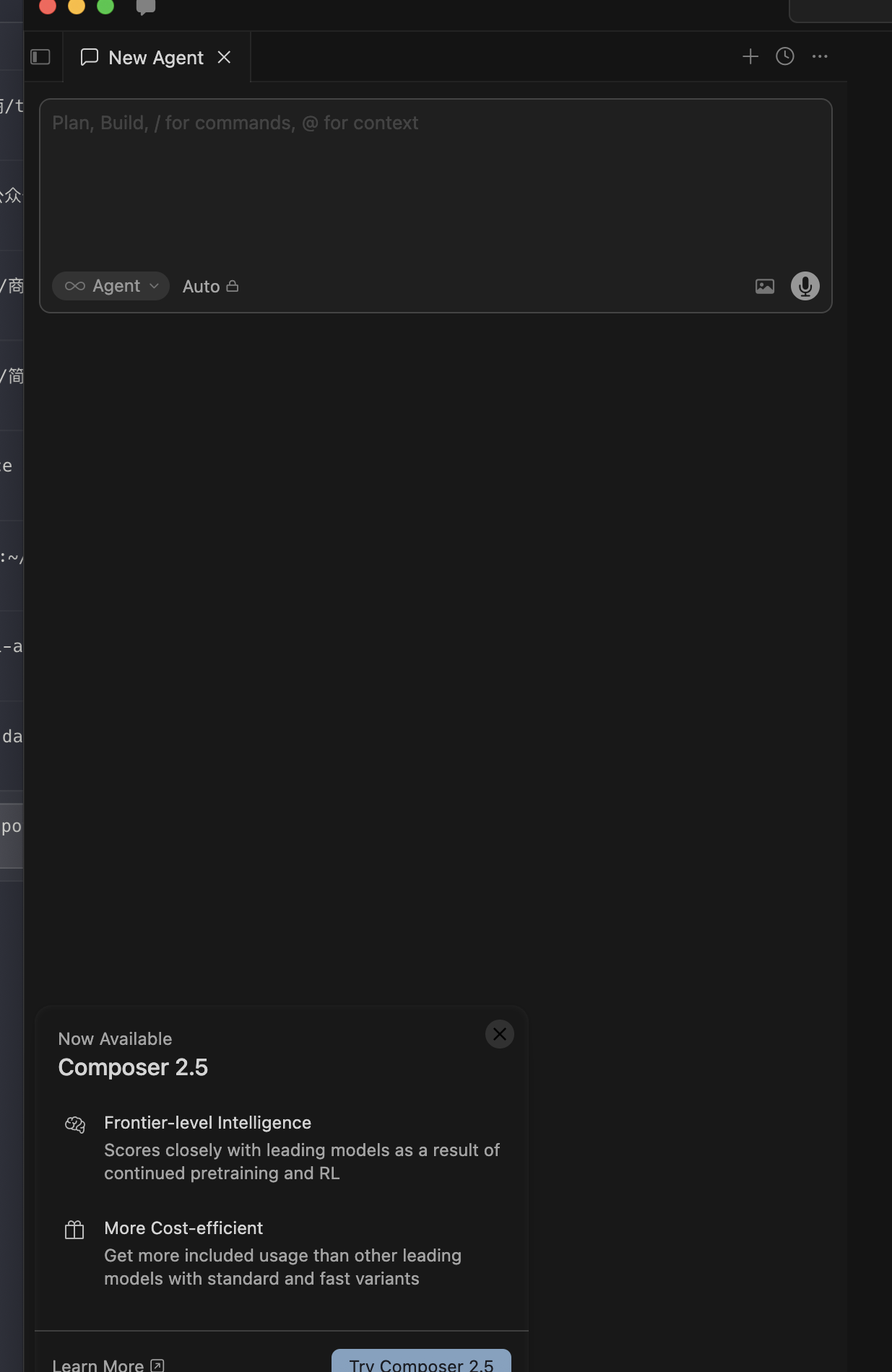
Read the wording in that card carefully — it’s Cursor’s own marketing summary of the model:
- Frontier-level Intelligence: “Scores closely with leading models as a result of continued pretraining and RL”
- More Cost-efficient: “Get more included usage than other leading models with standard and fast variants”
Now, the step-by-step:
- Update Cursor to a recent version (3.4+ at time of writing). On macOS:
Cursor → Check for Updates. The onboarding card and the model selector won’t show Composer 2.5 on older versions. - Open the agent panel with
Cmd+I(macOS) orCtrl+I(Windows/Linux), or just open any project — recent Cursor versions surface the agent automatically. You should see the “New Agent” panel with thePlan, Build, / for commands, @ for contextplaceholder and anAgent/Autoselector underneath. - Either click “Try Composer 2.5” in the onboarding card (one-click switch to the standard tier), or click the
Automodel selector in the input bar and pick Composer 2.5 manually from the list. Both routes reach the same place. - Verify the tier. After switching, the model selector will show
Composer 2.5— make sure it’s the standard tier, not “Fast” (see §3 for the pricing gap). The Fast variant is the default on Composer 2, and Cursor’s release post explicitly says Composer 2.5 keeps this behavior.
If you don’t see the onboarding card or Composer 2.5 in the dropdown, the rollout hasn’t reached your account yet — restart Cursor first, and if that doesn’t work, wait 24-48h. Cursor staggers feature rollout per-user.
5. When to use Composer 2.5 — and when not to
Composer 2.5 is the right pick when:
- You’re already in Cursor and want a default agent model
- Cost matters and your workload is output-heavy (long code generations, multi-file refactors)
- You can tolerate the rare benchmark gap vs Opus 4.7 / GPT-5.5 because the savings buy more iterations
- You want a coding model that’s specifically tuned for Cursor’s agent loop (tool calling, file ops, terminal use) — which Composer 2.5 explicitly is
Reach for Opus 4.7 or GPT-5.5 instead when:
- You’re doing deep reasoning on hard novel problems — math-heavy, algorithmic, “no obvious example to interpolate from.” The frontier models still have an edge on tasks that need to invent solutions rather than recombine patterns.
- You’re outside Cursor (using the model in your own backend agent, via raw API). Composer 2.5 is Cursor-only; the other models are general-purpose.
- You need multi-modal input (images, video, audio). Composer 2.5 is text-only.
For everyday “fix this bug / refactor this file / write tests for this function” work inside Cursor, Composer 2.5 is the new default I’d reach for. The cost gap vs Opus 4.7 is too big to ignore.
6. The big picture
What Cursor did with Composer 2.5 is the playbook for the next twelve months of coding agents: take an open-source base, train it hard on the specific tool loop your IDE/agent uses, undercut the closed-model giants on price. Cline, Continue, Aider, and every other agent shell will be looking at this and asking whether they can do the same.
For builders, the practical takeaway is simple: the cost floor of “good enough coding model” just dropped by 4×. If your last build-vs-buy decision was based on Opus 4.7 pricing, it’s worth re-running the math.
Related Articles
- 7 Minutes to Master Gemini 3.5 Flash — Google’s agent-tier model, similar Cursor model option
- Gemini 3.5 Flash vs Claude Haiku 4.5 — Apples-to-apples comparison of the other agent-tier race
- How to Use Gemini 3.5 Flash — Step-by-step IDE setup including Cursor