How to Enable Claude Opus 4.8 in Cursor, Claude Code & the API
Claude Opus 4.8 went live on May 28, 2026. But unlike a phone OS update, it does not just appear everywhere at once. Depending on which surface you use, you either get it automatically, have to update a CLI first, or have to change a model ID string by hand.
The single most common confusion: you open Claude Code, you’re still on 4.7, and Opus 4.8 isn’t even in the model picker. That is almost always a stale CLI version, not an account problem — and the fix is one command.
This is the complete switch guide for every surface, with the exact commands and the one model-ID gotcha that silently breaks API calls.
Key facts:
- Anthropic API model ID:
claude-opus-4-8— dashes, not a dot.claude-opus-4.8is invalid and returns a 404 /not_found_error. - Claude Code requires v2.1.154 or later to see Opus 4.8. Run
claude updatefirst. (Source: Claude Code model configuration docs) - claude.ai and the desktop app: Opus 4.8 is in the model picker now; no update needed.
- The effort parameter defaults to
highon every surface, including the API and Claude Code. (Source: Anthropic models overview) - If 4.8 is missing from your Claude Code picker, the cause is a stale CLI version 95% of the time.
The 30-second answer
| Where you use Claude | How to switch to Opus 4.8 |
|---|---|
| Claude Code | claude update, then /model and pick Opus 4.8 |
| Claude Code (one session) | claude --model claude-opus-4-8 |
| claude.ai / desktop app | Click the model name in the prompt box → Opus 4.8 |
| Anthropic API | Set model to claude-opus-4-8 (dashes, not a dot) |
| Cursor / Cline / other IDE tools | Update the extension, then select Opus 4.8 in its model menu |
| GitHub Copilot | Already GA — pick Claude Opus 4.8 in the Copilot model dropdown |
If you only do one thing: in Claude Code, run claude update and then /model. That fixes the “4.8 isn’t in my list” problem for almost everyone.
For what actually changed in 4.8 and whether it’s worth switching, see our companion piece: Claude Opus 4.8 — the 4 changes builders should actually care about.
Looking for Claude Fable 5? It’s suspended — Opus 4.8 is the fallback
If you landed here after trying to switch to Claude Fable 5 and finding it unavailable: that’s expected, and you’re not doing anything wrong. Anthropic suspended all access to Fable 5 (and Mythos 5) on June 12, 2026 — three days after launch — under a US export-control directive. As of June 19, 2026 there is still no announced return date, and the suspension is global: it hit US customers too, not just non-US users. (Source: Anthropic; full timeline in our suspension writeup.)
Two reasons Opus 4.8 is the natural fallback right now:
- Everything except Fable 5 / Mythos 5 is unaffected. Opus 4.8, Sonnet 4.6, and Haiku 4.5 remain fully available on every surface. Only the two Mythos-class models are down.
- Fable 5 already routed hard cyber / bio / chem work to Opus 4.8 by design — its safety classifiers hand those requests to Opus 4.8. So for a large class of work, Opus 4.8 was the model doing the job underneath anyway. (Details in how to switch to Fable 5, for when access returns.)
If your pipeline pinned claude-fable-5 between June 9–11, the fix to get unblocked today is a one-line change: swap the model string back to claude-opus-4-8 (mind the dash — see the Anthropic API section below). When Fable 5 access is restored, switching back is the same one-line change.
Status note: this is a moving situation — Anthropic says it is negotiating to restore access. Verified June 19, 2026; check the suspension writeup for the latest.
Claude Code: the full walkthrough
This is where most people get stuck, so it gets the most detail.
Step 1 — Check your version
claude --versionYou need v2.1.154 or later for Opus 4.8 to be available. If you see anything lower (or 2.1.15x where the last digits are below 154), that’s your problem — 4.8 literally isn’t in the build you’re running.
Step 2 — Update the CLI
claude updateThis pulls the latest Claude Code. Re-run claude --version afterward to confirm you’re now on 2.1.154+. (At time of writing, the current line is 2.1.156.)
This single step is the fix for the most common complaint: “I opened Claude Code, it was still on 4.7, and switching models didn’t even list 4.8.” The model picker only shows what your installed CLI version knows about. An old CLI has no idea 4.8 exists.
Step 3 — Open the model picker
Inside a Claude Code session, type:
/modelYou’ll get an interactive picker that looks like this:
 Select model

❯ 1. Opus 4.8 (1M context)   ✔ recommended
  2. Opus 4.7
  3. Sonnet 4.6
  4. Haiku 4.5
  5. Default (recommended)

  Esc to cancel
Use arrow keys, hit Enter on Opus 4.8. As of v2.1.153, selecting a model in /model saves it as the default for all new sessions — it writes the model field into your user settings, so you don’t have to re-pick every time. (Source: Claude Code model configuration)
/model is also the most reliable way to confirm what you’re on, because it shows whatever the server is currently serving your account — not a cached guess.
Step 4 — Or switch for a single session
If you just want to try 4.8 for one run without changing your default:
claude --model claude-opus-4-8Note the dashes. The CLI also accepts the short alias opus for “the latest Opus,” but pinning the explicit claude-opus-4-8 is safer if you want to stay on this exact version after 4.9 ships.
Step 5 — Or pin it in settings
To set it permanently without the picker, add the model field to your Claude Code user settings (~/.claude/settings.json):
{
  "model": "claude-opus-4-8"
}
This is the same field /model writes for you. Editing it by hand is useful for dotfiles, shared team configs, or CI environments where you can’t run an interactive picker.
Step 6 — Verify
Run /status inside a session, or /model again and look for the checkmark next to Opus 4.8. If it’s there, you’re done.
A note on Dynamic Workflows: the new parallel-subagent feature that ships alongside 4.8 is gated to Claude Code for Enterprise, Team, and Max plans only. Switching the model to 4.8 does not unlock it on lower tiers — that’s a plan gate, not a model gate.
claude.ai and the desktop app
No update needed here. Anthropic rolls the model out server-side.
- Open claude.ai (or the Mac/Windows desktop app).
- In the prompt box, click the model name at the bottom-right (it’ll say “Opus 4.8”, “Sonnet 4.6”, or whatever you last used).
- Pick Opus 4.8 from the dropdown.
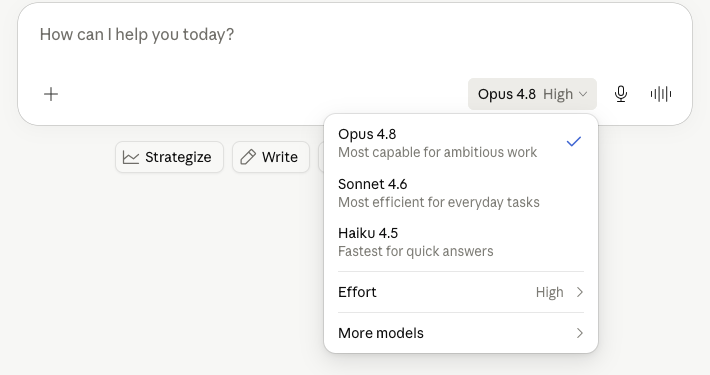
The claude.ai picker. Opus 4.8 sits at the top (“Most capable for ambitious work”). The “Effort: High” row and “More models” submenu are new with the 4.8 generation.
Two things to notice in that picker:
- Effort: High. This is the effort slider. Opus 4.8 defaults to
high. You can push it toextra(called “xhigh” in Claude Code) ormaxfor hard one-shot problems, but high is the right default for almost everything — the cost-quality curve flattens fast above it. - More models. Older versions (Opus 4.7, Sonnet 4.5, etc.) live behind this submenu if you need to pin to one for a reproducibility reason.
The Anthropic API: mind the dash
For direct API use, switching is a one-line change — set the model field to:
claude-opus-4-8The gotcha that bites everyone: it’s claude-opus-4-8 with dashes, not claude-opus-4.8 with a dot. A dot returns a 404 not_found_error and people waste 20 minutes assuming their API key is broken. Starting with the 4.6 generation, Anthropic switched to a dateless, all-dashes format (claude-opus-4-6, claude-opus-4-7, claude-opus-4-8) — each one is a pinned snapshot, not an evergreen pointer. (Source: Anthropic models overview)
Minimal curl to confirm it works:
curl -s https://api.anthropic.com/v1/messages \
  -H "x-api-key: $ANTHROPIC_API_KEY" \
  -H "anthropic-version: 2023-06-01" \
  -H "content-type: application/json" \
  -d '{
    "model": "claude-opus-4-8",
    "max_tokens": 100,
    "messages": [{"role": "user", "content": "Reply with the model you are running."}]
  }'
In the official SDKs it’s the same string:
# Python
import anthropic
client = anthropic.Anthropic()
msg = client.messages.create(
    model="claude-opus-4-8",
    max_tokens=100,
    messages=[{"role": "user", "content": "hello"}],
)
// TypeScript
import Anthropic from "@anthropic-ai/sdk";
const client = new Anthropic();
const msg = await client.messages.create({
model: "claude-opus-4-8",
max_tokens: 100,
messages: [{ role: "user", content: "hello" }],
});If you use prompt caching or mid-conversation system messages, update to the latest SDK — older SDK versions reject the new message shapes. (Details in the what-changed writeup.)
Cloud platforms: AWS Bedrock, Vertex AI, Microsoft Foundry
Opus 4.8 is available on AWS (via Amazon Bedrock), Google Vertex AI, and Microsoft Foundry. The exact model-ID string differs per platform, and the safest move is to read it from each platform’s model catalog rather than typing it from memory.
The naming follows the same dateless dash pattern as 4.7:
- Claude Platform on AWS uses the same IDs as the Claude API — i.e.
claude-opus-4-8. - Amazon Bedrock (Bedrock-style IDs) follows the
anthropic.claude-opus-4-xpattern that 4.7 used (anthropic.claude-opus-4-7). - Vertex AI follows the
claude-opus-4-xpattern 4.7 used (claude-opus-4-7).
Confirm the exact current string in your platform’s model list before shipping — cloud model IDs occasionally carry version suffixes (-v1:0) that the first-party API does not. (Source: Anthropic models overview, Claude Opus 4.8 on AWS)
Note: on Microsoft Foundry, Opus 4.8 has a 200k-token context window, not the 1M you get on the first-party API.
Cursor, Cline, and other third-party IDE tools
These wrap the Anthropic API, so two things have to line up:
- The tool’s model list has to include 4.8. That ships in an app/extension update — so update Cursor / Cline / your tool of choice first.
- The underlying SDK has to be recent enough to accept any new message shapes (mid-conversation
systementries, etc.). If the tool errors on those, it’s running an old SDK and you wait for its next release.
In practice: update the extension, then pick Claude Opus 4.8 from its model dropdown. If it’s not listed yet, the tool hasn’t shipped support — there’s nothing to change on your end except wait or, if the tool lets you type a raw model ID, enter claude-opus-4-8.
GitHub Copilot
Claude Opus 4.8 is generally available in GitHub Copilot as of the launch. (Source: GitHub Changelog) Open the Copilot model picker (in VS Code, the chat panel’s model dropdown) and select Claude Opus 4.8. If you don’t see it, update the GitHub Copilot extension.
Which effort level should you use?
Once you’re on 4.8, you get the effort control. Short version:
| Effort | Use it for |
|---|---|
| high (default) | Almost everything — coding, agent loops, normal chat |
| extra (“xhigh” in Claude Code) | A single hard sub-step: an architecture decision, a tricky refactor, a planning turn |
| max | Hardest one-shot problems with no time pressure; research-grade reasoning |
The clean pattern in Claude Code: bump to xhigh for the planning turn of a multi-step task, drop back to default for the execution turns. The plan benefits from more thinking; the execution usually doesn’t. Don’t run your whole session on max — you’ll pay for thinking you don’t need.
Troubleshooting
| Symptom | Cause | Fix |
|---|---|---|
Opus 4.8 not in Claude Code /model list | Stale CLI version | claude update, then /model |
| Still on 4.7 after opening Claude Code | Old default pinned, or old CLI | claude update; /model → Opus 4.8 |
API returns 404 not_found_error | Used claude-opus-4.8 (dot) | Use claude-opus-4-8 (dashes) |
| SDK errors on new message fields | Old SDK version | Upgrade anthropic (Python) or @anthropic-ai/sdk (TS) |
| Dynamic Workflows not available | Plan gate, not model gate | Requires Claude Code Enterprise / Team / Max |
| 4.8 missing in Cursor / Cline | Tool hasn’t shipped support | Update the extension; wait if not listed |
| claude.ai shows old model | Cached UI | Reload the page; click the model name and reselect |
Bottom line
For 90% of people the whole “how do I switch to 4.8” question is solved by one of two things: in Claude Code, run claude update and then /model; everywhere else, just pick Opus 4.8 in the model menu. The only true gotcha is the API model-ID format — claude-opus-4-8, dashes, not a dot.
Once you’re on it, the changes worth knowing about — the 4× lower prompt-cache minimum, 3× cheaper fast mode, mid-conversation system messages, and Dynamic Workflows — are covered in Claude Opus 4.8: the 4 changes builders should actually care about.
Sources
- Claude Code model configuration — Claude Code docs
- Models overview — Anthropic docs
- Introducing Claude Opus 4.8 — Anthropic
- Claude Opus 4.8 is now available on AWS — AWS
- Claude Opus 4.8 is generally available for GitHub Copilot — GitHub Changelog
- Companion: Claude Opus 4.8 — the 4 changes builders should actually care about