Gemini 3.5 Transcribe costs about half a cent per recorded minute — but timestamps cut the file limit in half
Google released Gemini 3.5 Transcribe in public preview on August 26, 2026. The recorded-audio model costs an estimated $0.005 per minute and the Live API variant about $0.009 per minute. Builders must choose between clean smart transcripts and the metadata needed for searchable meeting archives.
Google released Gemini 3.5 Transcribe in public preview on August 26, 2026. It is a dedicated speech-to-text model in the Gemini API, Google AI Studio, and Gemini Enterprise Agent Platform. (Source: Google official blog, 2026-08-26)
Key facts:
- The recorded-audio model ID is
gemini-3.5-transcribe. The real-time WebSocket model ID isgemini-3.5-transcribe-live. (Source: Gemini API model documentation, 2026-08-26) - Recorded transcription has an estimated blended price of about $0.005 per minute. Live transcription is about $0.009 per minute. Both have a free API tier during preview. (Source: Gemini API pricing)
- The file endpoint accepts up to one hour of audio per request. Enabling speaker diarization or word timestamps lowers that limit to 30 minutes. (Source: Gemini API model documentation, 2026-08-26)
- Google says it supports automatic detection across 85+ languages and up to 1,000 custom vocabulary terms. (Source: Gemini API transcription guide)
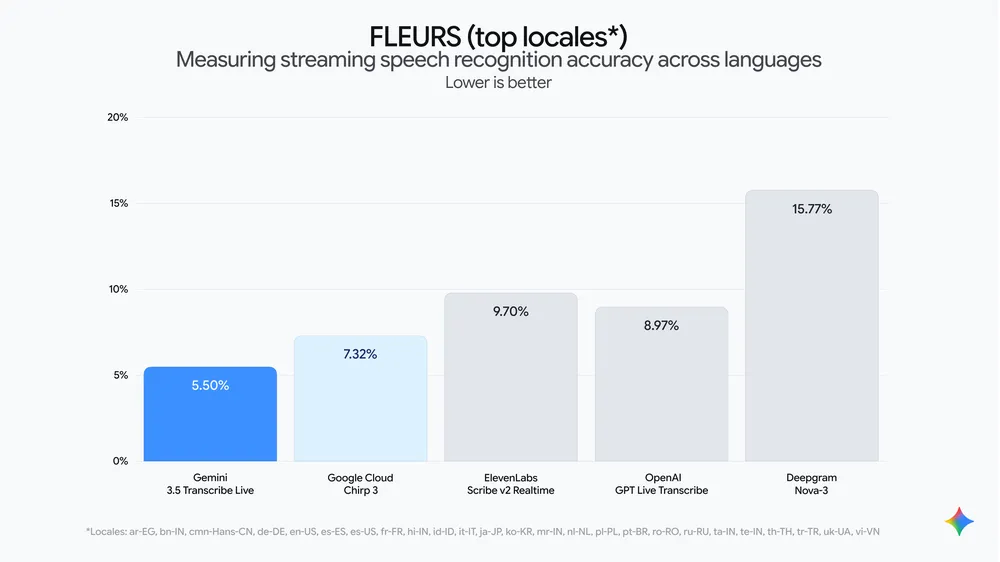
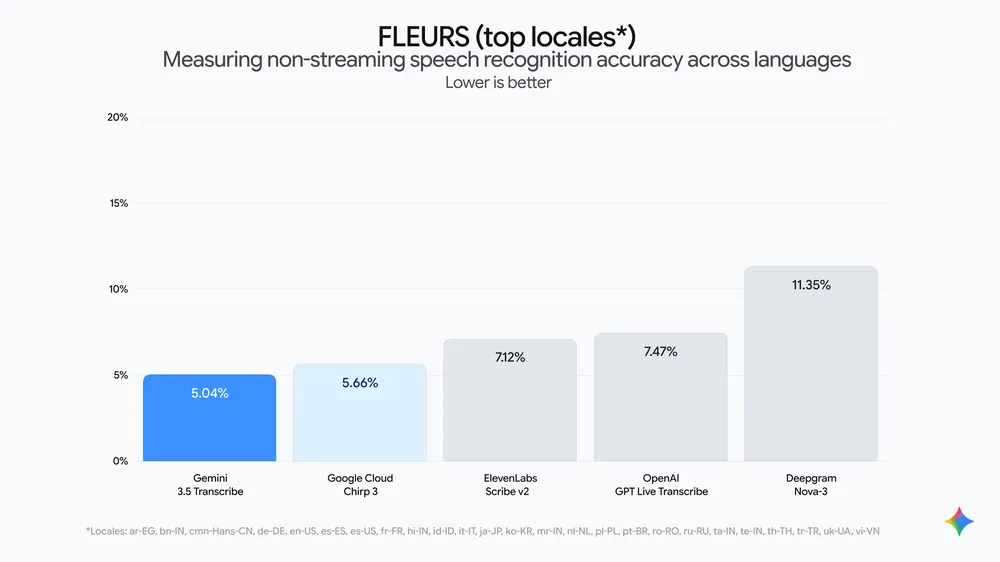
- Google cites an average WER of 4.0% for streaming and 2.6% for non-streaming in Artificial Analysis measurements. Treat those as vendor-reported benchmark figures, not a production guarantee. (Source: Google official blog, 2026-08-26)
What this means if you’re building with Gemini
Do not treat the two model IDs as interchangeable. Use gemini-3.5-transcribe for uploaded calls, interviews, or podcasts. It can return speaker labels and word-level timestamps. Use gemini-3.5-transcribe-live for captions and voice agents. The live endpoint has a 10-minute session maximum and does not support word timestamps or diarization. (Source: Gemini API model documentation, 2026-08-26)
Choose transcript readability or archive metadata before you build. smart mode removes fillers, resolves spoken self-corrections, and formats dates and numbers. It cannot be combined with timestamps or speaker diarization. Meeting-search and compliance workflows therefore need verbatim mode; a dictation or note-taking product may prefer smart. (Source: Gemini API transcription guide)
The cheaper-looking line item does not make it a generic Gemini replacement. The model page lists no caching, function calling, code execution, file search, or thinking support. Keep a separate Gemini model for post-transcript summarization, extraction, or agent actions. Our Gemini 3.5 Flash guide covers that general-purpose API path, while Gemini Managed Agents is the relevant next layer when a transcript must trigger a workflow.
Sources: Google — Introducing Gemini 3.5 Transcribe · Gemini API — model documentation · Gemini API — transcription guide · Gemini API — pricing · Google DeepMind — Gemini 3.5 Audio model card
Related: How to use Gemini 3.5 Flash · How to use Gemini Managed Agents · Gemini Spark
Source: Google (official blog)